AI can build a working screen in seconds. What it can’t do yet is tell you why that screen feels off. So people type the only instruction they have: “make it look better.” The AI changes some colors, adds a shadow, and the screen still feels off.
The best engineering in the world doesn’t matter if people don’t click the thing you want them to use. That part is design, and design has rules. Once you can name the rule, you can tell the AI exactly what to change.
This page collects those rules, one at a time. Each one has a short video, a before and after, and a prompt you can copy. I’ll add a new law with every episode.
1. Visual hierarchy
The rule: everything on a screen is fighting for attention, and you decide who wins.
People don’t read a page top to bottom. Here’s the order the eye usually takes on a typical landing page:
- A face comes first. A photo or illustration of a person wins every time. That’s how we’re wired.
- Then the biggest headline, because we want to know what’s going on.
- Then back to the face.
- The paragraph gets skipped.
- Straight to the button, if the button is loud.
So if you put a big face, a big headline and a bright button on one screen, you’ve built three things that fight each other, and the words you actually wanted people to read lose.
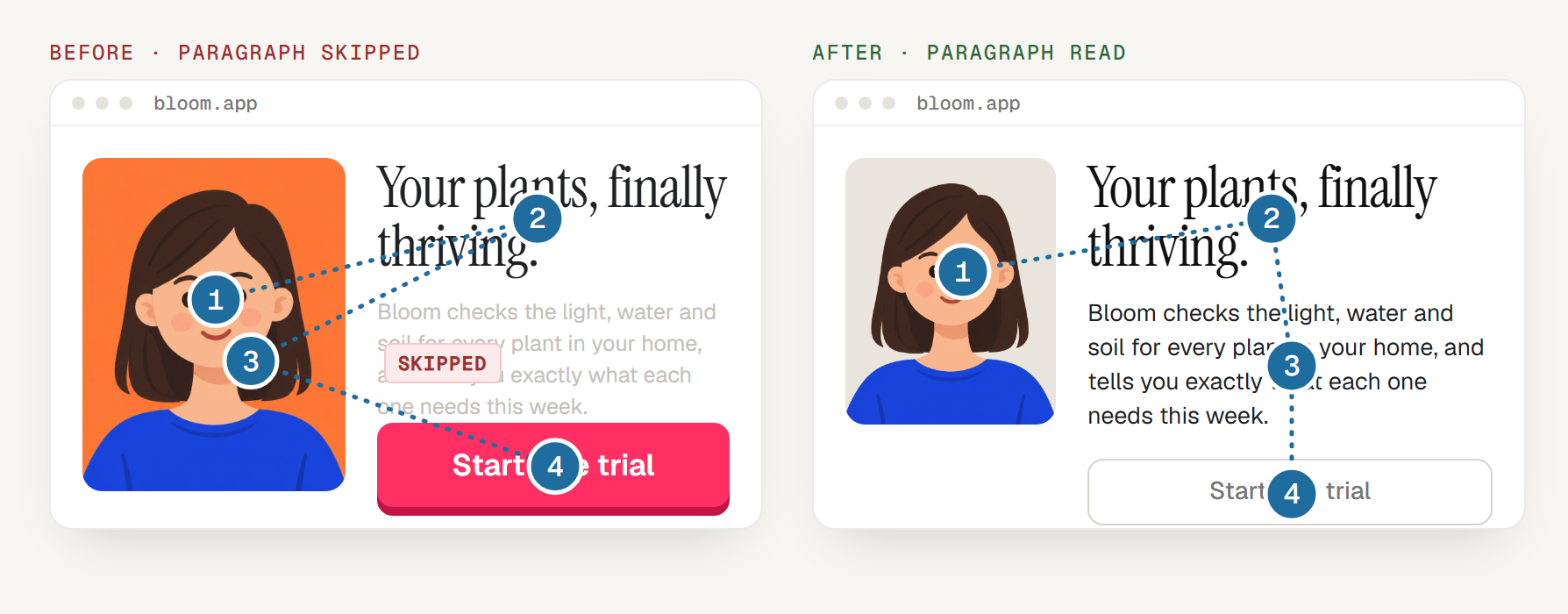
The eye paths are illustrations of the pattern, not eye-tracking data.
The fix: design the path on purpose. People tend to look where a face in the picture is looking, so turn the face toward what you want read. Give that text the most contrast. Let the button wait its turn.
Tell your AI:
Have the person in the photo look toward the headline. Give the headline and paragraph the highest contrast on the page. Make the button quieter (outlined, not filled) so it doesn’t compete with the text.
2. Contrast: push and pull
The rule: whatever has the most contrast against its background is what people see first.
Picture a dark, moody photo with one bright spot. You don’t decide to look at the bright spot. Your eye just lands there. Interfaces work the same way. Contrast is how you pull something forward, and lowering contrast is how you push something back.
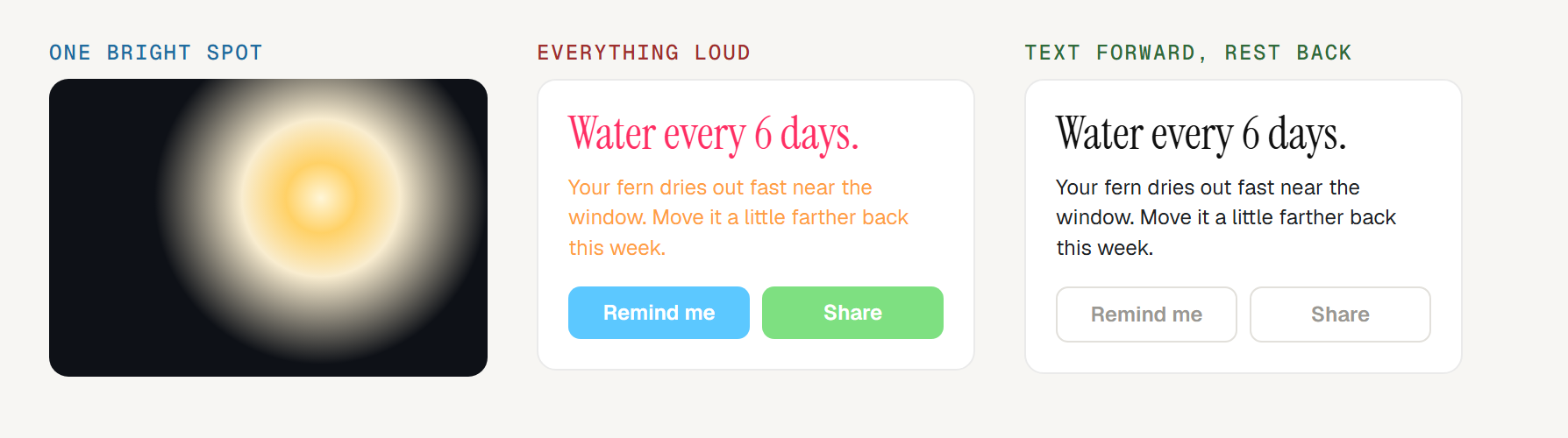
In the middle card, everything is bright, so nothing stands out. In the card on the right, the words are dark and sharp against the white, and the buttons are dulled to gray. The text comes forward and the actions step back until you need them.
You can use this on anything: a button, a line of text, a photo. To pull something forward, raise its contrast. To push something back, dull it: a darker or grayer background, softer color, less saturation.
Tell your AI:
Make the main message the highest-contrast thing on the screen. Push everything else back: gray out secondary buttons, soften the background, and remove any bright color that isn’t the one thing I want people to see first.
Bonus: how designers spot an AI-built site
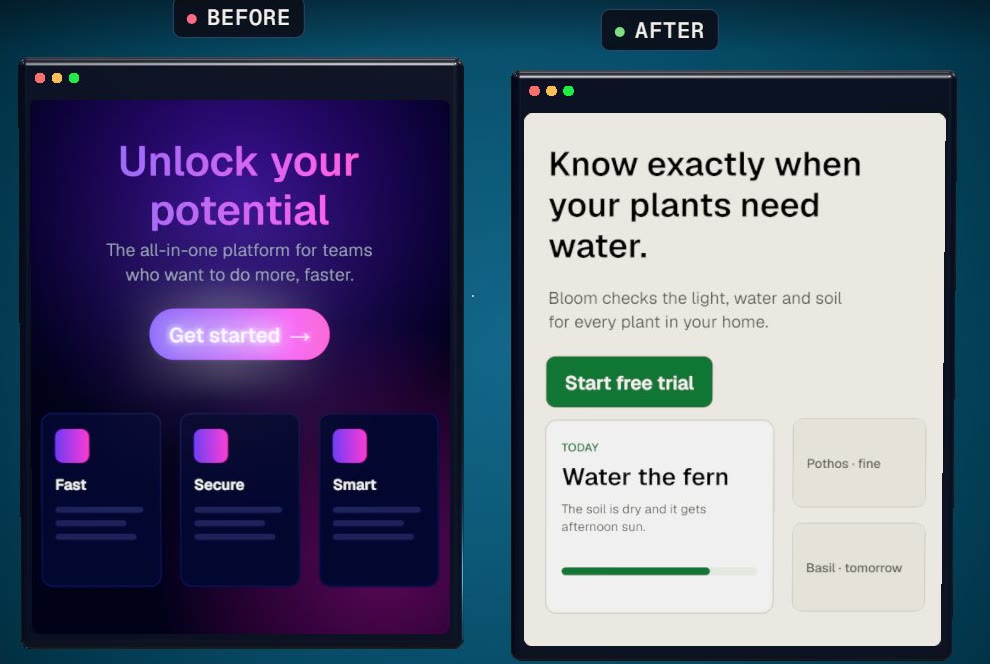
A designer can usually tell a site was built by AI in about two seconds. Not because any one choice is wrong, but because the same four show up together:
- The purple-to-pink gradient. On the button, the headline and the background. It’s on so many AI-built sites that it reads like a template.
- Everything is centered. Every line and every block runs straight down the middle, so nothing leads your eye anywhere.
- Three identical cards. Same icon, same size, same three lines. When everything is equal, nothing is important.
- A headline that says nothing. “Unlock your potential.” “Supercharge your workflow.” You could put it on any product.
None of these is wrong on its own. Together, they say nobody made a decision.
Tell your AI:
Pick one color that isn’t purple. Left-align the text. Make one card matter most. Say what the product actually does.
Every screen needs a resting spot
Both laws, and all four tells, come down to one idea. When everything asks for attention, nothing gets it, and people don’t know where to look first. A good screen gives the eye one obvious place to land, then leads it where you want it to go next.
That’s the difference between “make it look better” and actually fixing it.
More laws coming with each new episode. Follow Vector Ghost on YouTube, TikTok or Instagram to catch the next one.